System Module
Overview
The System Module provides essential device configuration management and global user interface utilities (like Toasts and Loading Screens). It is typically initialized as the “Core Module” within the MainSystemSettings.
Inspector Settings
These settings are found within the SystemModuleInitializer asset.
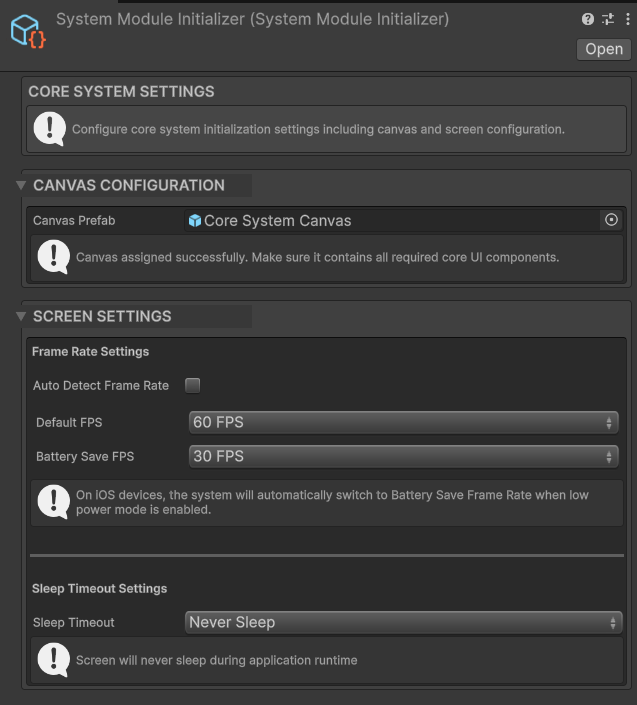
System Module Inspector Settings
Screen Settings
Controls how the application handles frame rates and sleep timers.
Frame Rate
- Set Frame Rate Automatically:
- Enabled: Attempts to match
Application.targetFrameRateto the device’s screen refresh rate (e.g., 60Hz, 120Hz). - Disabled: Uses the manual values defined below.
- Enabled: Attempts to match
- Default Frame Rate: The target FPS during normal gameplay (e.g.,
Rate60). - Battery Save Frame Rate: The target FPS to switch to when the device is in Low Power Mode (iOS only) or explicitly requested.
Sleep
- Sleep Timeout: Determine when the screen should dim or turn off.
-1 (Never Sleep): Prevents the device from sleeping. Essential for most games.-2 (System Default): Follows the user’s OS settings.0 (Custom): Uses the Custom Sleep Timeout value.
- Custom Sleep Timeout: Time in seconds before sleep if the mode is set to 0.
UI References
- System Canvas: A prefab reference containing the UI elements for the Toast Message and Loading Panel. This canvas is instantiated automatically at runtime.
Scripting Reference
Namespace: MobileCore.SystemModule
SystemManager Class
A static helper class for displaying global UI feedback.
Methods
| Method | Description |
|---|---|
ShowMessage(string message, float duration = 2.5f) | Displays a floating “toast” message at the bottom of the screen. |
ShowLoadingPanel() | Activates a blocking overlay with a loading spinner. Useful for async operations. |
ChangeLoadingMessage(string message) | Updates the text displayed on the active loading panel. |
HideLoadingPanel() | Deactivates the blocking overlay. |
Usage Example
using MobileCore.SystemModule;

public void OnLevelComplete()
{
    // Show a quick success message
    SystemManager.ShowMessage("Level Completed!");

    // Start loading next scene
    StartCoroutine(LoadNextLevel());
}

private IEnumerator LoadNextLevel()
{
    // Block input and show spinner
    SystemManager.ShowLoadingPanel();
    SystemManager.ChangeLoadingMessage("Loading World...");

    yield return new WaitForSeconds(2f); // Simulate work

    // Hide when done
    SystemManager.HideLoadingPanel();
}